For a static resource, resource points are the layout coordinates of the resource graphics. For dynamic resources, resource points are auxiliary points where multiple resources may appear graphically when in use or parked at a multi-capacity node. When a resource arrives at a node, it will appear on that node unless a resource point is defined for that resource at that node. The resource will appear on the resource point when it arrives to park or perform a task at a particular node. Resource points prevent resources from appearing on top of each other. In the case of dynamic resources, resource points are defined in terms of an offset from the node to which they are connected. Resource points are defined in terms of an offset from the upper left corner of the layout for static resources.
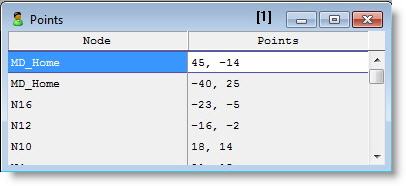
The following Resource Points edit table shows that node MD_Home has two resource points attached to it. The horizontal offset is 45 units for the first point and - 14 for the second. The vertical offset is - 40 down for the first point and 20 units up from the node position for the second. (For resource points positive distances are up and to the right.)
Whenever physicians arrive at node MD_Home, they will automatically go to one of the two resource points. This prevents the physicians from graphically appearing on top of each other if they are both at node MD_Home simultaneously.
How to add resource points to a node:
Please Note: Resource points are automatically added to the home node for each resource graphic placed on the layout.
How to delete resource points:

|
© 2012 ProModel Corporation • 556 East Technology Avenue • Orem, UT 84097 • Support: 888-776-6633 • www.promodel.com |